To cloud or to compute, that’s the question

The ultimate dream of any marketer is to have its brand become a verb. “Let me quickly Xerox that”, “I Fedexed it to you yesterday”, “I just Googled it”. In cloud computing I do not see that happening any time soon. At least I haven’t heard anyone say they Amazoned their intranet or forced their custom apps yet. But it is also unlikely we will be calling it cloud computing forever.

Cloud computing is not the first new kind of computing. Previously we saw “interactive computing” – indicating that it was no longer processed in an overnight batch – and “client/server computing” –indicating it ran with a graphical user interface and not on a boring green screen terminal. But pretty soon the new way became the norm and we resorted back to simply calling it “computing”.

For cloud computing there are basically two options, we will either call it computing again – meaning it is perceived as a slightly improved version of the same old, slow and expensive service they used to get from the EDP or IT department. Or users may start to use a new name: “Since we cloud our email, the cost has gone down considerably”, “Our new CIO agreed with the CEO to cloud as much as possible, and the results have been amazing”.

Don’t get me wrong, I am not advocating to try and repeat the oldest trick in the IT book of putting a new name or label on old ideas. Like when we started calling everything e-something and we renamed our companies to Something.DOT.com. Some of that is already going on around as cloud washing (companies renaming their existing offerings to be perceived as cloud solutions, even if they have little to do with cloud).

Now it may take some time to get used to clouding as a verb – as I am sure it took some time to get used to texting as a verb. And what does not help is that – till now – the only things people clouded were issues.

For people that grew up in IT this idea of calling it cloud may sound silly. Why on earth would we use a new name for something that basically is computingas we invented it (or at least as we intended it). But it won’t be the IT people deciding what to call it; it will be the next generation of users. The same generation that – at least in Holland – massively adopted the verb computering. “What did you do last night?” “Oh not much, got pizza, watched a movie and computered a bit”. It’s the generation that came up with verbs like texting, computering and gaming. All not very results oriented activities, but that’s not the point.

The point is that if it feels like traditional computing – where you depended on an IT department to get service and decided what you were allowed to do – they will likely simply call it computing again. If it feels completely different, with more freedom, more possibilities and more speed and agility, it deserves to become a verb.

PS Anticipating the popularity of “to cloud” a Dutch vocabulary site is already showing the full conjugation here.

In cloud standards, it’s all about survival of the fittest

The Kuppinger Cole European Identity Conference 2011 (EIC), which was held in Munich earlier this month, truly represented a ‘Who’s Who’ of cloud initiatives and standards.  Representatives from many influential, established and aspiring standards and industry bodies were on hand to showcase progress of the security initiatives currently in the works.

The number of initiatives is overwhelming. For years the joke was that any time two Dutch meet, they are likely to start an association or co-operative initiative, but apparently that is also true for security and cloud experts. I won’t bore you with all the clever acronyms (it’s a true alphabet soup), but I do want to highlight the more interesting overall findings.


In one of the first forum sessions – called “In Cloud We Trust” – Dr. Laurent Liscia of OASIS gave an interesting perspective on these competing standards. He compared the process of establishing an accepted standard to a Petri dish (no relation).  Multiple cultures in a nutritious environment all trying to do a land grab. A process that is not orchestrated, it’s ‘eat or be eaten’ and it is hard to predict the outcome because the process takes time.  No amount of pressure  or additional heat can accelerate it and watching a Petri Dish real-time is about as useful and as interesting as watching grass grow. Meaning, it’s better to wait for history to run its course.

Having said that, there one initiative from this forum – which had participants from ENISA, The World Economic Forum, TRUSTe and CA Technologies – that I do want to highlight, even though the implementation is still in an incubation phase.

Earlier this year the World Economic Forum IT partnership – in collaboration with Accenture and with input from a steering group including representation from CA Technologies – published “Advancing cloud computing: what to do now?” with eight recommended action areas. 
The reason I mention this particular initiative is because of the enormous influence this organization has on governments. As associations all over the world realize that legislation and government stimulus may determine the success of their regional cloud industry – an industry that is likely to be the next economic engine of prosperity – they are rapidly publishing recommendations on what they feel their local governments should do to facilitate the success of cloud computing. So as not to be drowned out in the aforementioned alphabet soup of initiatives, it makes sense to anchor such local recommendations against the global guidance of the World Economic Forum. 

The recommendations are not earth shattering, but if governments and the cloud ecosystem participants could streamline their efforts around these eight, it would further these efforts in a useful and pragmatic way. For more info read the (very readable) full report, but in a nutshell the recommendations are:

  1. Explore and facilitate the realization of the benefits of cloud
  2. Advance understanding and management of cloud related risks
  3. Promote service transparency
  4. Clarify and enhance accountability across all relevant parties
  5. Ensure data portability
  6. Facilitate interoperability
  7. Accelerate adaptation and harmonization of regulatory frameworks
  8. Provide sufficient network connectivity to cloud services

P.S. During the event I participated as a forum member in “Cloud Standardization: From Open Systems to Closed Clouds?,” and “Identity and Access in the Cloud.” I will be speaking more about the topic of lock-in at the upcoming International Cloud Expo in New York (June 6-9), and I will cover cloud computing and risk during the Middle East Financial Technology Conference (MEFTEC) in Abu Dhabi (May 30-31).

April 21, the day the cloud was out!

Some blogs percolate for a while, waiting for a good day to be put to paper. For this one – about the cost of reliable cloud – that day was last Thursday, the day a network mishap caused an outage at Amazon Web Services taking down more than 100 customers, many of which cloud providers themselves, in its aftermath, while at the same time a similar mishap at Sony PlayStation´s network stopped about 70 million gamers from connecting.

A lot has been written about the outage, so I won’t repeat that here (if you want to catch up suggest you read: TechCrunch for the PlayStation story, GigaOM for an overview of the Amazon issue, eWeek for some interesting analysis and the DotCloud blog for a very readable explanation of day to day use of a public cloud service like Amazon).
Instead, let’s focus on the big picture of the cost of reliable cloud, comparing it – again – with the move from mainframe to distributed computing.  History tends to repeat itself, especially in IT where generations of technology tend to be heavily siloed, and staffed with different generations of people who often do not even sit at the same table in the canteen.

Somewhere during the 1980s, IT pros started to realize they could get the same processing power for significantly less money, when selecting distributed servers – till that time used mainly for scientific work – instead of traditional mainframes.  Soon after, companies began porting existing applications to the new platforms, focusing initially on applications that were more compute than I/O or data intensive (sounds familiar?). And indeed, initially the new departmental platform, not requiring all the resource intensive water cooling, air-conditioning or a heightened floor did seem a lot more cost effective. But, it didn’t take long after initial proofs-of-concept to find that for some applications we needed more processors or to set up clusters, or uninterruptable power supplies and other redundant features. On the storage front, we started to use the same – not so cheap – storage solutions as we did on the mainframe. And shortly thereafter, the distributed boxes started to look and cost about the same as the systems they were replacing. Let’s not forget that at the same time, smart mainframe developers – pushed by the competition from distributed systems – found ways to abandon water cooling, leverage off the shelf standard components like NICs and RISC processors and even re-examined their licensing cost for specific (Linux) workloads.

What does this all have to do with cloud computing? Likewise, we see that running a certain “compute intensive” workload can be done much faster and cheaper in the new environment. But when replacing these one-off batch jobs with services that have higher availability and reliability needs, the picture changes. We need to have redundant copies and failover machines in the data center, and in many cases a backup data center in another part of the country, preferably located on an alternate power grid and connected to multiple network backbone providers. All of a sudden it sounds a lot like the typical set-up a bank would have – and likely with a similar cost profile. So far cloud seems to offer cost benefits, but will this cost advantage still exist if we need to replicate our whole cloud setup at a second vendor – worst case scenario, doubling the cost.  Now cloud has many other advantages beyond cost (elasticity, scalability, ubiquitous access, pay per use, etc.), so many specific use cases are still ideally suited  for the cloud, but if a certain application has no need for these, then it may be worth (re-)considering the business case for a move to the cloud.

Regarding redundancy, the cloud business case actually has two opposing vectors. On one hand, there is the fact that as a user you have less control (you can’t fly there and ‘kick’ the server) leads to requiring a secondary backup installation. On the other hand, the cloud – with its pay-as- you-go model – offers much more efficient ways to arrange for a backup configuration for running your applications, than finding your own second location and filling it with shiny new kit.

At the same time you have to take into account the likelihood of the cloud having capacity available at the moment you need it. If your own data center fails, I am sure you could find another cloud provider with some capacity. But in this case, where one of the largest (cloud) data centers in North America had issues, all customers, in principle, could be looking to move their workloads elsewhere, it is not certain that enough excess capacity would be available at alternate providers.

In this specific case there seemed to have been technical issues inside Amazon and Sony’s data centers that caused a series of events impacting the services running within, but what if there had been a major physical problem, such as a large fire or accident? With more mission critical applications moving to the cloud, companies need to make contingency planning a top priority.

As a result of last week’s incidents, enterprises should take stock to assess what services are truly vital to their customers and/or to their own continuity. Organizations (and the world) seem to be more resilient than you might expect. In the Netherlands we saw Telcos ceasing mobile service in a large part of the country  for periods of up to half a day, with ISPs unable to offer Internet services for as long as a week in certain regions. And yet, these companies did not go under. Each industry, government and organization will have to assess its own priorities and success metrics/criteria and standards. As I mentioned in a past blog post, aiming to continue your on-demand video services after a mayor flood, hurricane or nuclear disaster may be over-shooting what is necessary under those circumstances – survival will be the only concern in a case like that.

Looking at the reactions in the market so far, the responses of the vendors impacted by the Amazon mishap seem to be a lot more benign that the reactions of impacted PlayStation gamers. Maybe because these vendors feel they have a good thing going and the last thing they won’t to do is kill it by too much honesty. What is refreshing is that not too many vendors crawled out of the woodwork saying “private cloud, private cloud, private cloud” — not even my colleagues who recently published a book on the topic. Good!  Nobody loves “I told you so” types and there’s no point in kicking your opponent when he is down. But the case for private cloud did get a bit better, or is it just me thinking that?

5 Simple Rules for Creating a Cloud Strategy

Over the last 18 months, the media, technologists, analysts, CIOs and CEOs have all been talking about the cloud. Now, most organizations are embarking on some form of cloud computing, but as always, technology is the relatively easy part. For those of you wanting to keep your feet firmly on the ground, and looking to set your direction and strategy, here are some simple guidelines to help you along the way.
CCL image courtesy of deleted.scenes - http://www.flickr.com/photos/dephineprieur/3571763921/sizes/s/in/photostream/
1. Start your cloud strategy (and any cloud project) with an exit strategy

Now this may seem like contradictory advice, but there is a great risk of vendor lock-in with cloud computing than there is with traditional on premise software, and I’m sure that you will be aware of the downside of vendor monopolies such as high cost, low responsiveness and inflexible vendor business practices, which result in vendor lock-in and prohibitive switching costs.
A second important reason to avoid vendor lock-in to any cloud computing services is that unlike today, where software is purchased and then used to deliver services to customers, in the cloud era organizations are directly dependent on external providers to deliver those services. The impact of a breakdown or contract termination of as a service delivery is much more immediate to the business, it is therefore imperative to have a plan B.
Ideally you will architect your cloud services and contracts in such a way, that you can move to an alternative (Plan B) within a reasonable timeframe. A definition of reasonable depends on the type of business and may vary be between six months and six seconds. Standards, although currently just emerging, will play a crucial role and I recommend that you consider any implementations that are not based on such standards as temporary. Meanwhile the automation capabilities of vendor neutral management tools can help enable such exit strategies in a cost effective manner.


2. Design IT as a supply chain
Although deceivably simple, this analogy will help to change both the way the IT organization thinks and acts and, how other departments perceive IT. Supply chain thinking allows you to both buy and build; it allows you to make all your decisions in the context of what your company needs in order to deliver services to its customers. It allows you to look at what your IT department owns in-house but also all the services you sourced externally too. A good rule of thumb in setting your IT supply chain strategy is the lean mantra: Only do what adds value to your customers and remove any steps/activities/processes that don’t add value or aren’t legally required.
A supply chain approach means dynamically balancing resources (both internal and external) against rapidly changing goals and constraints towards an optimal end result. This is a very different game from traditional IT where IT operations avoided changing anything that was not broken to “keep the lights on” in the most reliable and stable manner possible. Just as in a car factory the product mix changes constantly, new products are introduced while others are phased out, the supply chain will enable IT to switch services on and off as and when required.


3. Use a portfolio approach for deciding WHAT to move to the cloud

A good cloud strategy is as much about WHAT to do as about HOW to do it. A portfolio approach helps you identify which services could be moved to the cloud and deliver cost savings and agility to the business, versus the more business critical services which – at this time – are less desirable to move to the cloud.
A portfolio approach needs to begin with the strategic goals of your organization in mind. These goals may vary from becoming customer focused to launching products in emerging markets or; reducing cost within the business.
Once the strategic goals are identified, these need to be matched to business or market constraints for example legislation, resources, geography or finance. The final step would be to map the goals and constraints to existing IT services and your cloud based opportunities.
From this exercise you will produce a roadmap of what you need to do; how you allocate human, financial and technical resources to deliver the most critical services and, monitor progress against your plan.
IT portfolio planning is not a one-off exercise and not something that can implemented overnight. It will constantly evolve as the business evolves and as IT gains maturity and experience in consuming and deploying cloud services.  It is a good starting point to determine  your “low hanging cloud fruit” which could add considerable value in terms of benefits or cost savings quickly and, those services which are too business critical to be put into the cloud.


4) Make service costing a core competency
If cloud computing it going to achieve one of the goals it is heralded for, then it needs to remove unnecessary cost – not just move CAPex to OPex.
Regardless of whether a service is completely rendered in house, composed from various sourced components or procured completely as a service, it is essential to understand the exact cost characteristics and the impact on the overall cost of doing business.
IT needs to be able to determine the cost of each service delivered rather than just the cost of individual IT functions. For example, services may include payment processing, issuing tickets, sending invoices, creating an order, facilitating video conference calls and delivering online training courses.
In electronics manufacturing the heads of production are not interested in how much the company spends in total on plastic versus aluminum or copper, but they want to know whether they can offer their new product at a competitive price compared to their competitors.  In the same way, IT needs to prepare itself for such discussions, can they deliver services at an optimal cost, and if not, can they suggest a viable alternative?
Cost reduction is not the only reason or benefit when adopting cloud computing, increased accountability and agility and reliability are a few other areas which cloud computing can really impact positively. So whilst increasing transparency in the cost of IT services will give you insight into areas to optimize from a cost perspective, you may need to balance this view with potentially needing to increase investment in the short term for greater business agility.


5. Treat security as a service
Security or to be precise “fear of a lack of security” is consistently cited as the biggest barrier to cloud computing. However, a recent study conducted by Management Insight and sponsored by CA Technologies showed that 80 percent of mid-sized and large enterprise organizations have implemented at least one cloud service, with nearly half saying they have implemented more than six cloud services. This adoption is happening even though 68 percent of respondents cite security as a barrier to cloud adoption. These survey results indicate that for now cost and speed of deployment are leading reasons for cloud adoption and are strong enough to offset the perceived risks associated with deploying cloud services. This may be a sufficient for now, but as increasingly sensitive data and applications are selected to migrate to the cloud, organizations will quickly reach an impasse.
The security challenge with the “supply chain” model is an organization’s ability to dynamically control access of a variety of users across a changing portfolio of applications running internally and externally from multiple suppliers.
The cloud computing model demands a rethink about how security is approached- making it an enabler instead of an inhibitor. The challenge is, not denying access to everyone, but letting the right people access the data they need to have access to (and no more than that) and to actively control the usage to prevent any out-of-the-ordinary activities.

Now having shared some advice and suggested first steps to start planning, I’d like to add one last thought.
The appropriate speed for deploying cloud computing depends on the culture and current state of your organization and realistically you aren’t going to be in the cloud tomorrow. The US Federal government issued a directive called “Cloud First.” This is basically a type of “Comply or Explain policy” which states that cloud options should be evaluated first (comply) unless there are significant reasons not to do so (in which case departments should explain). Pushing the accelerator that hard might not be everyone’s cup of tea, but whatever you do: don’t rush in, but also make sure you do not get left behind!

More on fabric computing in the cloud

In my last post I covered the concept of fabric computing and why it matters in the world of cloud computing.  With a “fabric” approach towards creating a cloud application, we include the virtual compute, storage and network components inside a fully software-based model of the service. This is distinctly different from a more traditional approach, where the various resources are added and configured one by one.

In response to a comment, I also suggested that this new approach could be compared to a modern espresso machine.  Such a machine delivers a complete service (coffee!) – in an integrated fashion.  No need to worry about the temperature of the water, grinding the beans, any other steps or equipment required to make it happen.

In a cloud computing context, the fabric is integrated “out of the box,” like the espresso machine. It doesn’t require provisioning, managing, integrating and monitoring lots of VMs and appliances individually. Most cloud solutions approach building a cloud by automating these individual steps – typically through scripting — but this approach has distinct drawbacks. I included a short demo of the fabric approach below, but to understand these drawbacks we will use another analogy:


The parable of the spreadsheet and the calculator

CCL image courtesy of Ivan Walsh - http://www.flickr.com/photos/ivanwalsh/5187183980/sizes/s/in/photostream/
                                                    
Imagine you are an accountant and you can choose between using a spreadsheet (a fabric) or an automated (scripted) calculator.  Both a calculator and a spreadsheet have similar base functions (add, subtract, multiply, square root). On a calculator, you start with a value and you perform functions against that. If you perform the same functions every month you could put these in a script, so you can play them back automatically next time. You could even edit that script to do it slightly different. This may makes things easier, but it is not a spreadsheet. With a spreadsheet you can have several versions next to each other (you can do a “Save as”), a change in one area immediately updates the other areas (it is integrated, there is no need to rerun a script), you can send a spreadsheet to other users or to your accountant.

Have a look at the demo below to see how that applies also to a fabric cloud application (including “save as”, creating multiple versions, send it to someone else to run).  But first ask yourself: when did you last see an accountant with a calculator? In fact automated calculators never really took off. Spreadsheets (fabrics) are simply the better way.

Seeing is believing: the epiphany of a demo
When I personally saw my first demo of this concept in action, it reminded me of two earlier occasions where a demo later reshaped IT as I knew it. The first was after I installed Windows 1.0 (all 12 floppies). Sure back then it was still monochrome, there were no applications and the performance was not great, but it did make me think: “Boy, if they ever get this to work, it will really change how we use desktop computers.”

The second “epiphany” was my first experience with X86 virtualization. After having confiscated the biggest machine in the office with the most memory, and after quite some tinkering I saw an actual X86 machine boot inside a window (of course this was not an actual machine – it was a virtual one). After it booted, it could not do much, and running two of them brought the whole machine to a grinding halt. Yet, it did make me think: “Wow, if this ever scales, it can completely change how we handle our machines.” And (admittedly somewhat to my surprise), about a decade later around 2009, X86 virtualization did actually start to scale and it developed into the billion dollar industry that is changing the way we manage our servers.

Just like Windows profoundly changed the way we use desktops and virtualization is changing the way we manage servers, this new software-based, virtual fabric approach, in my view will change the way we manage data centers. Now I was certainly not the first person to realize this. Nicholas Carr already acknowledged the power of this approach in his book “The Big Switch.” In an interview with eCommerce Times, he subsequently said:

“In 3Tera’s AppLogic, you can see the broad potential of virtualization to reshape how corporate IT systems are built and managed…”

How is that so? Well, my marketing colleagues here created quite an entertaining video , but the original – now vintage – 5-minute demo that shows how to define an application as an integrated fabric is also still out there (and shows the potential much better than my above ramblings).
CA 3Tera AppLogic software essentially enables you to do three things: 

1) First, you set it up on commodity x86 servers, creating a single fabric for the storage, network and compute capabilities on those servers.
2) Then, using an integrated modeling tool, you take your application or service – including all its components, such as data, networking, load balancing, security etc.– and create a 100% software based model (using a Visio-like drawing tool – check out this InformationWeek demo from Cloud Connect to see this in action).
3) Next, you can deploy a model of the fabric, with the software allocating resources based on the model, and providing automated scaling, metering and fail over capabilities.
You can also move the service or application to another data center very simply, even to one in another country or at another provider. Or, you can copy it and provide the same service to another department or customer (nearly instantly).

For a long time, CA 3Tera AppLogic software was kind of an industry insider secret. Several analysts and writers – like Nicholas Carr – were aware of it, discussed it and listed it in their publications. But today there are many case studies and real life success stories of both small and large implementations out there. This may be a good time for you to have a closer look; if only as an interesting implementation of these new fabric computing trends and principles in action.

Is fabric computing the future of cloud?

The term fabric computing is gaining rapid popularity, but currently mostly within the hardware community. In fact, according to a recent report, over 50% of attendees at the recent Datacenter Summit had implemented, or are in the process of implementing, fabric computing. Time to take a look at what fabric computing means for software and for (cloud) computing as a whole.

Depending on which dictionary you choose, you can find anywhere between two and seven meanings for “fabric.” Etymology-wise, it comes from the French fabrique and the Latin fabricare, and the Dutch Fabriek actually means factory. But in an IT context, fabric has little to do with our often used manufacturing or supply chain analogies; instead it actually relates much closer to fabric in its meaning of cloth, a material produced (fabricated) by weaving fibers.


If we check our handy Wikipedia for fabric computing, we get:

Fabric computing or unified computing involves the creation of a computing fabric consisting of interconnected nodes that look like a ‘weave’ or a ‘fabric’ when viewed collectively from a distance.[1]

Usually this refers to a consolidated high-performance computing system consisting of loosely coupled storage, networking and parallel processingfunctions linked by high bandwidth interconnects …

In the context of data centers it means a move from having distinct boxes for handling storage, network and processing towards a fabric where these functions are much more intertwined or even integrated. Most people started to note the move to fabric or unified computing when Cisco started to include servers inside their switches, which they did partly in response to HP including more and more switches in their server deals. Cisco’s UCS (Unified Computing System), and its bigger sibling, VCE, are the first hardware examples of this trend (although inside the box you can still distinguish the original components).

One reason to move to such a fabric design is that by moving data, network and compute closer together (integrating them) you can improve performance. Juniper’s recent QFabric architecture announcement is another similar example. But, the idea of closer integration of data, processing, and communication is actually much older. In some respects, we may even conclude IT is coming full circle with this trend.

Let me explain.

Many years ago I spoke to Professor Scheer, founder of IDS Scheer and a pioneer in the field of Business Process Management (BPM). (Disclosure: years later IDS Scheer became part of my former employer: Software AG.) He spoke about how – in the old days of IT – data and logic were seen as one. Literally! If – while walking with your stack of punch cards to the computer room (back then it was a computer the size of a room, not a room with a computer in it) – you dropped your stack of punch cards, both data and logic would be in one pile on the floor. You would spend the rest of your afternoon sorting them again. There was just one stack: first the processing/algorithm logic, and then the data. Scheer’s point was that just like we figured out after a while that data did not belong there and we moved it to its own place (typically a relational database), we should now separate the process flow instructions from the algorithms and move these to a workflow process engine (preferably of course his BPM engine). All valid and true – at that time.

But not long after, Object Oriented programming became the norm, and we started to move data back with the logic that understood how to handle that data, and treat them as objects. This of course created a new issue of having these objects perform in an even more remotely acceptable way, as we used relational databases to store or persist the data inside these objects. You could compare this to disassembling your car every night into its original pieces in order to put it in your garage. Over the years the industry figured out how to do this better,in part by creating new databases which design-wise looked remarkably similar to the (hierarchical) databases we used back in the day of punch cards.

And now , under the new shiny name of fabric computing we are moving all these processes back in the same physical box.

But this is not the whole story — there is another revolution happening. As an industry we are moving from using dedicated hardware for specialized tasks to generic hardware with specialized software instead. For example, you might use a software virtualization layer to simply emulate a certain piece of specific hardware.

Or, look at a firewall: traditionally it was a piece of dedicated hardware built to do one thing (keeping non-allowed traffic out). Today, most firewalls are software-based. We use a generic processor to take care of that task. And we’re seeing this trend unfold with more equipment in the data center. Even switches, load balancers and network-attached storage are becoming software-based (virtual appliance seems to be the preferred marketing buzzword for this trend).

Using software is more efficient than having loads of dedicated hardware, and we can’t ignore the fact that software, because of its completely different economic and management characteristics, has numerous inherent advantages over hardware. For example, you can copy, change, delete and distribute software, all remotely, without having to leave your seat, and even do automatically. You’d need some pretty advanced robots to do that with hardware (if it could be done today).

So how do these two trends relate to cloud computing?
By combining the idea of moving stuff that needs to work together closer together (the idea of fabric) and the idea of doing that by using software instead of hardware (which gives us the economics and manageability of software) we can create higher performance, lower cost and easier to manage clouds.

Virtualization has been on a similar path. First we virtualized servers, then storage and networking, but all remained in their separate silos. Now we are virtualizing all of it in the same “fabric.” This means that managing the entire stack gets simpler, with one tool to define it, make it work and monitor it. And that’s something that should make any IT pro smile.

In my next post, I’ll share my thoughts on why I think this approach has the power to change IT as we know it, based on some of my own epiphanies.

An IT Supply-Chain model, once more with feeling

The idea of cloud computing making IT management more similar to supply chain management has been mentioned before; it’s time to take a closer look.


This post originally appeared as at ITSMportal.com

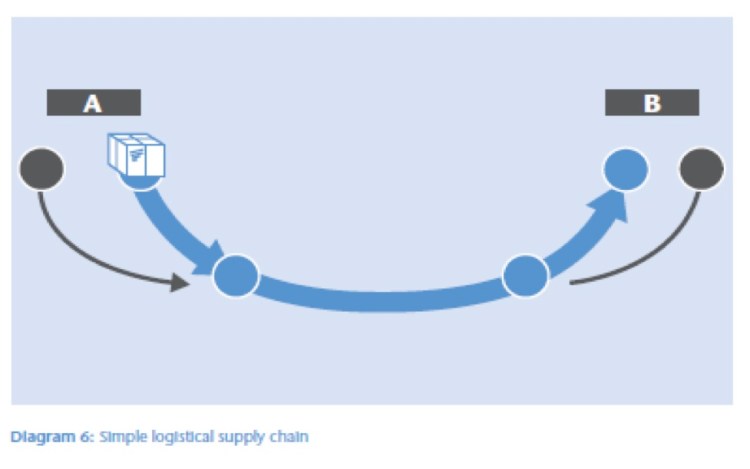
Let’s start by looking at the supply chain in its simplest imaginable form, even simpler than the supply chain at a manufacturing company. Think of a transport company – like a Federal Express, DHL or TNT – that transports packages from location A to location B. There are processes, people and resources needed to get the package from A to B within the supply chain.

The reality today is that many of these distribution companies do not actually come to your door themselves – at least not in every region or town; they use subcontractors and local partners at various points. It would be far too expensive for the delivery firm to have their own trucks and employ their own drivers in every remote country, city and village around the world. (Bear with me, we will get to cloud computing in a minute). This way, they can still offer you end to-end-service and keep you up to day of minute by minute parcel movements around the globe. They provide customers with tracking numbers – or “meta“-information (01001011). They know exactly which trucks are where, and with which packages; as a result they can “outsource” almost every logistical process (the outside arrows in our animated diagram).

diagram-1

figure 1: animated IT supply chain

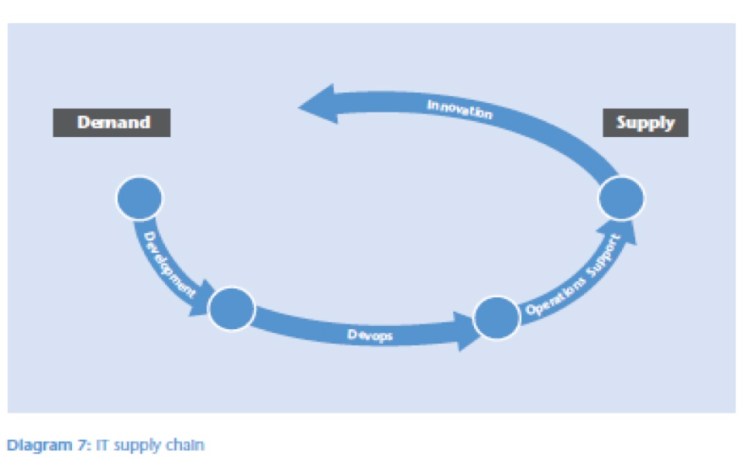
But IT does not transport packages from A to B (at least I hope that is not what you do all day!). IT meets the demands of the business by providing a steady supply of services. IT does not have trucks or warehouses, but departments such as development, operations and support that work within their supply chain. What an IT supply chain essentially does, is take IT resources – like applications, infrastructure and people – and use these to create and deliver services.

Some IT shops have decided not to react to demand, but to actively help the users – work with the business – figure out what they should want or need (shown by the arrow marked “innovation” in the diagram). A more recent trend is the introduction of DevOps, a way to closely connect and integrate the demand side with the supply side. This is often done in conjunction with the introduction of agile development processes.

Users typically care about speed, cost and reliability, not about whether IT used its own trucks or someone else’s. Speed – like in many supply chains – is one of the main criteria. Responding faster to customer or user demands reduces cycle time and time-to-market and makes organizations more agile and more competitive. The use of cloud computing in all its incarnations, such as Infrastructure as a Service (IaaS), Platform as a Service (PaaS) and Software as a Service (SaaS), can play an important role in further increasing this speed.

With IaaS, the IT department can significantly speed up the procurement, installation and provisioning of required hardware. Because of its OPEX model, no capital expenditure requests need to be raised, no boxes with hardware need to be unpacked, no servers need to be installed. Just as in the above distribution example, the organization can rapidly respond to heavily fluctuating demand, extreme growth or demand for new services by using  capacity if and when needed.

With SaaS the route from determining demand to getting a service up and running is even shorter, because the whole thing is already a service the minute we start looking at it. There is no buying, installing, or configuring of the software. It all runs already at the provider’s website. If you are implementing a solution for ten thousand users across hundreds of departments, the time you save by not having to install a CD is not that significant. Large SaaS implementations go live much quicker than traditional on premises implementations, in many cases for psychological or even emotional reasons.Once the solution is already running, users are much more willing to start using it on the spot. Many SaaS providers reinforce this further by specifically designing their software to enable simple “quick starts.”

diagram-2

In those cases where there is no readymade solution available, PaaS (Platform as a Service) can deliver significant time savings. As soon as the developer has defined the solution, it can be used in production. The PaaS provider – through its PaaS platform – takes care of all the next steps such as provisioning the servers, loading the databases, granting the users access etc. Comparing PaaS with IaaS, the big difference s that with PaaS, the provider continues to manage the infrastructure, including tuning, scaling, securing, and so forth.IT operations does not have to worry about allocating capacity, about moving it from test to production or about all the other things operations normally takes care off. And because the PaaS provider has already done this many, many times, it can be done immediately and automatically.

Sound too good to be true?
Well,actually it might be, because – although the above can be faster – it also can mean IT loses control and can no longer assure the other two aspects that users care about: reliability and cost. So, how can these concerns be addressed? In the same way as in the distribution example: by making sure that at all times, IT has all the information (010011001) about “where everything is,” or better, “where everything is running.”

This management system –call it a “cloud connected management suite” if you like – needs to not only give insight about where things are running and how well they are running, but also allow you to orchestrate the process, move workloads from one provider to another, and help you decide whether to take SaaS or PaaS applications back in house (or move them to a more trusted provider). Ideally it will allow you to dynamically optimize your environment based on the criteria –such as speed, cost reliability – and constraints – such as compliance, capacity, contracts – that are applicable at that moment in time to your specific business.

Clearly this dynamic approach is a long way from the more traditional “If it ain’t broke, don’t change it,” but IT will have to get used to this. Or – even better – embrace this new way of doing things, just like planners at industrial companies did. Today’s global manufacturing would not be as efficient and such a driver for the world’s prosperity if they had not started to optimize their global processes a long time ago.
There are, however, a number of prerequisites to be able to implement such a supply chain approach in IT. First, we need to achieve fluidity or movability of IT. IT needs to be able to take fairly sizable IT chunks and move them somewhere else with relative ease. On the infrastructure side, virtualization is a major enabler of this. Virtualization containerizes and decouples from the underlying hardware, thus acting as a dire needed “lubricant”. But to enable true movability, more is needed.

diagram-3
figure 1: animated IT supply-chain  (repeat)

Many of today’s applications are as intertwined as the proverbial plate of spaghetti. This makes the average datacenter a house of cards, where removing one thing may cause everything else to come crashing down. On the functional side, the use of Service Oriented Architectures can help, but we will also need to apply this thinking on the operational side.A virtual machine model is in many cases too low level for managing the movement of complete services; management needs to take place at a higher level of abstraction, ideally based on a model of the service.
The second hurdle is security. I don’t mean that the security at the external providers may be insufficient for the needs of our organization. In fact, the security measures implemented at external providers are often much more advanced and reliable than those inside most enterprises (fear for lack of security is consistently listed as top concern by organizations before they use cloud computing, but it rapidly moves down the list of concerns once organizations have hands-on experience with cloud computing). The real security inhibitor for the dynamic IT supply chain is that most organizations are not yet able to dynamically grant or block access to a constantly-changing set of users, across a fast moving and changing portfolio of applications running at a varying array of providers. This requires us to rethink how security is approached, where it is seen more as along the lines of “Security as a Service”, an enabler instead of an inhibitor.

The third consideration is that any optimization will have to work across the whole supply chain, meaning across all of the different departments and silos that the average large IT organization consists of. For example, it has to look at the total cost of a service, including running, supporting, fixing, upgrading, assuring, and securing it. Likewise, it also has to optimize the speed and the reliability – or at least give visibility into these – across the whole chain.

To prevent sub-optimization (the arch enemy of real optimization) one needs to understand and connect to many of the existing information and systems in these departments. Systems in diverse areas such as helpdesk, project management, security, performance, costing, demand management, data management, etc. IT supply-chain optimization is in its infancy and many start-ups are gearing up to offer some form of cloud management, but it will be clear that offering optimization requires quite a broad and integrated view of IT.

The end result of adopting a Supply Chain approach is that IT becomes more an orchestrator of a supply chain – a broker of services – than a traditional supplier of services. Demand and Supply are two sides of the same coin which occur (almost recursively) throughout the chain. Once we close the loop, the supply chain becomes a cycle that constantly improves and becomes more efficient and agile in delivering on the promises the organization makes to its customers, just like an industrial supply chain but also very much in the spirit of Deming and the original ideas around Service Management.

Vivek Kundra’s decision framework for cloud migration

A framework applicable beyond government and geographies

The decision framework for cloud migration that US Federal CIO Vivek Kundra recently published as part of his Federal cloud computing strategy, offers advice applicable to all organizations.


In my last blog, a cloud of two speeds, I mentioned Vivek Kundra’s very readable cloud strategy and the industry stimulus effect this approach can have on the emerging cloud industry. By presenting his strategy not simply as a way to cut costs and reduce budgets, but as a way to get more value from existing IT investments, he enlisted IT as an ally to his plans, instead of a potential opponent. Section two of the strategy is a pragmatic 3 step approach and checklist for migrating services to the cloud which can also be valuable for organizations outside the government and outside North America. 

The following is a short summary of this “Decision framework for cloud migration”.

The full Federal cloud computing strategy (43 pages and available for download at www.cio.gov) includes a description of the possible benefits of cloud computing, several cases, metrics and management recommendations. A short review of the document was given by Roger Strukhoff at sys-con

Decision Framework for Cloud Migration


The following presents a strategic perspective for thinking about and planning cloud migration.

Select
·   Identify which IT services to move and when
·   Identify sources of value for cloud migrations: efficiency, agility, innovation
·   Determine cloud readiness: security, market availability, government readiness, and technology lifecycle
Provision
·   Aggregate demand where possible
·   Ensure interoperability and integration with IT portfolio
·   Contract effectively
·   Realize value by repurposing or decommissioning legacy assets
Manage
·   Shift IT mindset from assets to services
·   Build new skill sets as required
·   Actively monitor SLAs to ensure compliance and continuous improvement
·   Re-evaluate vendor and service models periodically to maximize benefits and minimize risks
A set of principles and considerations for each of these three major migration steps is presented below.

1. Selecting services to move to the cloud

Two dimensions can help plan cloud migrations: Value and Readiness.


The Value dimension captures cloud benefits in three areas: efficiency, agility, and innovation.
The Readiness dimension captures the ability for the IT service to move to the cloud in the near-term. Security, service and market characteristics, organisation readiness, and lifecycle stage are key considerations.
Services with relatively high value and readiness are strong candidates to move to the cloud first.

Identify sources of value

Efficiency: Efficiency gains come in many forms. Services that have relatively high per-user costs, have low utilization rates, are expensive to maintain and upgrade, or are fragmented should receive a higher priority.
Agility: Prioritize existing services with long lead times to upgrade or increase / decrease capacity, and services urgently needing to compress delivery timelines. Deprioritize services that are not sensitive to demand fluctuations, are easy to upgrade or unlikely to need upgrades.
Innovation: Compare your current services to external offerings and review current customer satisfaction scores, usage trends, and functionality to prioritize innovation targets.

Determine cloud readiness

In addition to potential value, decisions need to take into account potential risks by carefully considering the readiness of potential providers against needs such as security requirements, service and marketplace characteristics, application readiness, organisation readiness, and stage in the technology lifecycle.
Both for value and risk, organizations need to weigh these against their individual needs and profiles.

Security Requirements include: regulatory compliance; Data characteristics; Privacy and confidentiality; Data Integrity; Data controls and access policies; Governance to ensure providers are sufficiently transparent, have adequate security and management controls, and provide the information necessary

Service characteristics include interoperability, availability, performance, performance measurement approaches, reliability, scalability, portability, vendor reliability, and architectural compatibility. Storing information in the cloud requires technical mechanism to achieve compliance, has to support relevant safeguards and retrieval functions, also in the context of a provider termination. Continuity of Operations can be a driving requirement.

Market Characteristics: What is the cloud market competitive landscape and maturity, is it not dominated by a small number of players, is there a demonstrated capability to move services from one provider to another and are technical standards – which reduce the risk of vendor lock-in – available.

Network infrastructure, application and data readiness: Can the network infrastructure support the demand for higher bandwidth and is there sufficient redundancy for mission critical applications. Are existing legacy application and data suitable to either migrate (i.e., rehost) or be replaced by a cloud service. Prioritize applications with clearly understood and documented interfaces and business rules over less documented legacy applications with a high risk of “breakage”.

Organisation readiness: is the area targeted to migrate services to the cloud pragmatically ready: are capable and reliable managers with the ability to negotiate appropriate SLAs, relevant technical experience, and supportive change management cultures in place?

Technology lifecycle: where are the technology services (and the underlying computing assets) in their lifecycle. Prioritize services nearing a refresh.

2. Provisioning cloud services effectively

Rethink processes as provisioning services rather than contracting assets. State contracts in terms of quality of service fulfillment not traditional asset measures such as number of servers or network bandwidth. Think through opportunities to :

Aggregate demand: Pool purchasing power by aggregating demand before migrating to the cloud.

Integrate services: Ensure provided IT services are effectively integrated into the wider application portfolio. Evaluate architectural compatibility and maintain interoperable as services evolve within the portfolio. Adjust business processes, such as support procedures, where needed.

Contract effectively: Contract for success by minimizing the risk of vendor lock-in, ensure portability and encourage competition among providers. Include explicit service level agreements (SLAs) with metrics for security (including third party assessments), continuity of operations, and service quality for individual needs.

Realize value: take steps during migration to ensure the expected value. Shut down or repurpose legacy applications, servers and data centers. Retrain and re-deployed staff to higher-value activities.

3. Managing services rather than assets

Shift mindset: re-orient the focus of all parties involved to think of services rather than assets. Move towards output metrics (e.g., SLAs) rather than input metrics (e.g., number of servers).

Actively monitor: actively track SLAs and hold vendors accountable, stay ahead of emerging security threats and incorporate business user feedback into evaluation processes. And track usage rates to ensure charges do not exceed funded amounts  “Instrument” key points on the network to measure performance of cloud service providers so service managers can better judge where performance bottlenecks arise.

Re-evaluate periodically the choice of service and vendor. Ensure portability, hold competitive bids and increase scope as markets mature (e.g., from IaaS to PaaS and SaaS). Maintain awareness of changes in the technology landscape, in particular new cloud technologies, commercial innovation, and new cloud vendors.


The above is a summary of the “Decision framework for cloud migration” section from Vivek Kundra’s Federal Cloud Computing strategy http://www.cio.gov/documents/Federal-Cloud-Computing-Strategy.pdf provided at www.cio.gov.


Disclaimer: This summary uses abridgements and paraphrasing to summarize a larger and more detailed publication. The reader is urged to consult the original before reaching any conclusions or applying any of the recommendations. All rights remain with the original authors.

A Cloud of two speeds: Europe vs. America

Cloud computing is gaining rapid acceptance, but not everywhere. Governments across Europe – in what many call “the old countries” –  are still remarkably conservative or even reluctant to embrace cloud computing.


This week President Obama organized a dinner with the CEO’s of 12 high-tech and cloud companies to stimulate job creation in North America, meanwhile – over in Europe – the Dutch Minister of the Interior replied to questions of parliament about the use of cloud computing by governments.The fact that this particular minister had to be invited three times by Dutch Employers Association to switch from his pre-war model cast iron bike to a more modern bicycle with gears and suspension, says something about the tone of this debate.


A hilarious misunderstanding was that the official government delegation kept referring to cloud computing as a new invention, while the representatives of the industry (including Google and a large international accounting firm) tried to explain that cloud computing was an established practice with many real life use cases and success stories, both inside and outside government organizations.


Remarkably the US and this European government announced almost at the same time a plan to radically reduce the number of government data centers:  by about 60 in the Netherlands, and by about 800 in the U.S. The underlying idea in the U.S. is to make greater use of “data centers as a service” a.k.a. cloud computing. On the other hand, the Dutch plan so far sounds more like a traditional consolidation approach with the objective of creating more efficiency by increasing the scale of use (an approach that has so far not proven to be very successful; in fact, we see globally that the bigger the scale of the projects, the more spectacular the reports in the public press about the outcomes).


In the meantime, the CIO of the U.S. Federal government, Vivik Kundra, published a very readable cloud strategy – at only 43 pages this is a must read for anyone involved in setting IT strategy (a shorter analysis can be found at sys-con). Kundra presented his strategy not as a way to save on IT costs, but as a way to get more value from existing IT investments. In many places, but certainly in the public sector, “protection of budgets” has become a primary survival strategy. By positioning cloud computing not as a way to cut cost but as a way to increase value he makes  IT (and of the whole civil apparatus) an ally to his plans, instead of a potential opponent.


The technology industry likely was already on his side, because the government’s ‘promised’ cloud spending in cloud services is likely to amount to about $20 billion per year, or 25% of the total budget. This annual amount is approximately equal to the total government investment required to put a man on the Moon. In my view, the U.S. government’s cloud program is also a way to create and safeguard jobs for the coming decade – in a sense, an industry stimulus program.


Due to European free trade rules and regulations, creating stimulus packages for national industries in Europe is at best complicated, and in many cases even illegal. Within the European Union, Neelie Kroes – the former free trade commissioner – has taken on the role of Commissioner for the Digital Agenda.  In a recent lecture, she indicated her ambition is to make Europe not only “Cloud-Friendly” but “Cloud-Active” (a kind of “all-in” strategy?). The plan is built around three core areas: 1) a legal framework, 2) technical and commercial fundamentals) and 3) the market. There are now more than 100 actions on her European Digital Agenda, of which more than 20 specifically addressing the European “Digital Single Market”, an online equivalent of the European single market for goods and services.


However, a fundamental problem for cloud computing in Europe is that the European Union was based on enabling free traffic of persons, goods and services, and NOT free traffic of DATA. This puts European providers of cloud services immediately at a disadvantage. American, but also Chinese, companies have a huge domestic market, which they can serve from one geographic location. Europe has, in theory, a similar large domestic market for cloud services, but the various European languages, cultures and laws make this market a lot less uniform than the American market. Some argue that this diversity has made European suppliers (or European divisions of global providers) better at providing a differentiated approach, instead of the more traditional “one size fits all” solutions. But in a fast growing new market like cloud computing, all this diversity does makes achieving the required scale more difficult.


And in addition to issues with European privacy laws as described in this NY Times article,
there are
a variety of local and national laws preventing local suppliers from serving the European (government) market from one location, even if this location lies within the European Union. For example, the German Government requires that all data of local government agencies is kept within Germany. From a historical perspective this may be understandable, but it prevents the European government sector from becoming a launching force for “One European Cloud Market.”


Maybe it’s time for a European cloud of two speeds? Just like we saw smaller groups of countries signing the Schengen treaty (which enabled traveling between selected European countries without checkpoints) or for the introduction of the Euro single currency, a small leading group of countries could opt for accelerated introduction of uniform cloud legislation.


Comments: Please leave them below or send a message to @ gregor petri on Twitter


PS for some links to the European local language sites we used automatic web translation facilities from Microsoft and Google. Thought that with #IBMwatson defeating the human trace at Jeopardy the time might be right for this. Let me know whether you felt these were useful or not.

Is your cloud strategy 3D-ready?

While the TV and consumer industry is getting ready for its next wave of innovation called 3D, the IT industry has been going through a similar three dimensional transformation. Let’s have a closer look at this 3D journey of IT and how a good cloud strategy should support all three dimensions. And don’t worry; you won’t need to wear funny 3D glasses to read this blog.

This post was originally published as a column on ITSMportal


Cloud computing is not the first innovation to hit IT – although the amount of hype and blogs seem to indicate otherwise – ever since the first computer got carried into the building all the way to the latest generation of tablets, the way we use IT, the things we use IT for and IT itself has been changing profoundly. We can classify these changes along three dimensions: Extending IT’s reach to new users and into new functional areas, Abstracting problems so they can be managed at new conceptual levels and Sourcing solutions from specialists where it makes sense.

Dimension 1 – Extend your reach

Traditionally the computers and applications that IT managed were used exclusively by employees. For example general ledger and inventory systems were accessed by the bookkeeping and manufacturing departments. This exclusivity has long gone. Applications have extended their reach and are now directly used by customers, by employees of partners and subcontractors and in some cases our applications reach out directly to suppliers or even suppliers of suppliers. This extension of reach has made IT a lot more time critical. Any failure can directly impact the customers’ experience.

In some cases the line between what is the business and what is the supporting application is even blurring completely. For many people banking is their home banking application, the service the travel agent provides is an application to book tickets and hotels and Telco’s run software to connect people. More and more the digital process is the becoming the business process itself.
Extending the reach of applications also has a severe impact on who should be given access to our systems and applications. From a ‘simple’ list of employees with their roles and responsibilities we are moving to a situation where the list of potential users is endless. Security is becoming less about keeping people out and more about enabling the right people to do the right things with decisions about who and what are allowed taking place at increasingly granular levels of detail and subtlety.
The inherent network orientation of cloud computing provide a natural fit for enabling “extend your reach”, but “extend your reach” goes beyond having more and different people accessing ITs’ applications. It is also about extending into completely new application areas. Recent examples are convergence of traditional data processing based IT with voice and video and ventures into “big data”, where analysis of volumes of information – traditionally to large or too diverse to sensibly process – leads to new insights and advanced levels of optimization. These applications go far beyond the “traditional business IT” applications that essentially were limited to capturing and processing administrative facts about business processes, with processing that seldom became more complex than adding and subtracting and the occasional multiplication. Cloud computing can help IT extend into these new, more complex, areas.

Dimension 2 – Abstraction – IT moving up in the food chain

When IT first started, companies could not buy computers, they had to build their own. Later on computers could be bought but they did not come with any applications or even an operating system.  Customers were expected to build these themselves, first in assembler, later in higher level languages, while nowadays many complete standard software applications are readily available. The point is that IT for years has been moving to higher levels of abstraction to enable them to move from extremely detailed technical work to higher level tasks.


Abstraction is basically the mechanism that makes modern IT possible. If we would still be required to manually manage every transistor on a modern chip, every register in a CPU or every disk in a content management system, IT would never get around to actually helping the business.
Abstraction occurs in programming, hardware and management. In programming we went from assembler via 3GLs and 4GLs to modern Object Oriented languages, where abstraction basically is the core concept. In storage we went from addressing blocks and spindles to disks to NAS or even content management systems. Similarly virtualization allows us to abstract from the underlying (detailed) physical implementation to a more standardized high level representation. And also in IT management we abstracted from managing individual components such as network, storage and processing to managing at higher conceptual levels such as services (ideally using some kind of service model).

Automation providing Abstraction

Abstractions have been around forever (in fact any spoken language can be seen as an abstraction describing underlying realities) but in IT they are often implemented through automation. We enable users to abstract to the higher level by “automating” all the tasks they traditionally had to execute at the lower level. Traditional programming was all about memory management, higher level languages take care of this automatically. Traditional data-processing was about running hundreds of sequential jobs across many sets of data in the right sequence, workload automation suites automated this away. SOA (Service Oriented Architectures) offer services that perform complex tasks “as a service” automatically. These automated services free the developer from having to manage or even understand the internal workings of the service he uses.

Automation is the engine that enables the user to manage processes at a higher, conceptual level. Having the right conceptual model is essential to success. Conceptual models come in many shapes and forms. A file system is such a conceptual model, so is a database. Programs, applications and services are another example of conceptual models covering different levels. A good conceptual model is close to the reality the user wants to manage and allows him to specify in the appropriate level of detail what the solution needs to do. Appropriate is the key word here. Assembler language does not provide a good model to implement General Ledger or CRM systems, but could be appropriate to define operating systems or microcode.

Appropriate cloud abstraction models

Traditionally conceptual models for new technologies closely resemble the old reality; remember how the first cars closely resembled carriages, but without the horses. The driver seat would be really high because he traditionally needed to be able to see over the horses ass. And even though the automobile had no horse anymore; the seat was still high up. Cloud computing is also still in search of the appropriate conceptual models to be managed through. Traditional datacenter management was about provisioning and starting and stopping servers and configuring networks. When using a private cloud to run applications a conceptual model around servers may be too detailed, a more appropriate model would be based on services not underlying machines.
In a similar fashion the industry will have to find conceptual models to manage the use of SaaS and PaaS cloud offerings. Initially people will try and manage these in the same was as we managed in house applications and development platforms, but over time we may move to higher more appropriate levels of abstraction. An interesting development here is the Service Measurement Index (created by the SMI consortium in cooperation with Carnegie Mellon University and hosted at cloudcommons.com) that aims to abstract the provided application services into a number of core characteristics that enable management at a higher abstraction level.

Dimension 3: Source – Divide and Conquer

The third dimension that IT has transformed itself along over the years is the sourcing dimension. As IT organizations moved on, they started to subcontract, outsource, offshore, procure as a service more and more tasks they traditionally did in-house.

To some extend abstraction and sourcing are related, they both result in the organizations not having to perform certain task themselves. But the two dimensions also tend to reinforce each other. The external providers perform their specialization at such scale that they are best equipped to automate their services up to a next level of abstraction. Many organizations that outsourced their service desk operations found that the provider rapidly moved from a Chinese army approach – where they processed millions of tickets manually – to offering automated remediation and self-service to make the support process more efficient. In-house teams simply did not have the time, skills or scale to set this up.
Sourcing also means letting go of control, no longer being able to step in and fix things yourself in case things go wrong. As a result any sourcing strategy should include an exit and a fail-over strategy. One CEO became acutely aware of these sourcing risks when he read about several companies ceasing service to Wikileaks. He asked his IT department how dependent they were on the IaaS (Infrastructure as a Service) vendor they sourced their capacity from. His IT department – always game for a good challenge – took up the gauntlet and 48 hours of non-stop programming, gallons of diet coke and tens of pizza boxes (containing cheese and salami, not CPU’s) later they had created the ability to automatically move their complete operations to another IaaS provider. Given the criticality of today’s IT from a business and personal perspective, every organization should consider such a divide and conquer strategy. By dividing the workload across multiple vendors or storing a shadow backup copy of critical data at an alternative vendor they can arrange instant failover and prevent themselves from being locked in.
Of course cloud computing has a distinct sourcing angle. In fact so much that many people see cloud computing basically as just another form of outsourcing. But the attractiveness of cloud computing is that it can further IT along all three dimensions. Extending ITs reach to new users and into new functional areas, abstracting problems so they can be managed at new conceptual levels and sourcing solutions from specialists where it makes send.
Such a 3D Cloud strategy enables you to Extend, Abstract and Source Your IT, something us acronym crazy IT folks maybe should call EASY IT.